
Multi-location
Region, Clinic, Provider as first-class data primitives. Filters apply across the entire operation. Role-based access for the actual structure of your team. amplifyOMS was built by a practice owner who ran 22 clinics in Texas, so the multi-location architecture isn't bolted on. It's how the system was designed from day one.
Multi-location is not a reporting feature.
Most practice management systems were designed for a single clinic. Multi-location capability got added later, usually as a reporting layer that aggregates data from clinics that still operate as essentially independent units. The data model wasn't built for multi-location; the dashboard was. The difference matters when you try to do anything beyond the dashboard.
You can tell the difference because the symptoms show up at the edges. The patient seen at Clinic A last month who books at Clinic B this month has two files, or one file that doesn't surface the Clinic A visit. The provider who covers three clinics has three sets of settings. The regional manager who runs five clinics has five logins. The franchise structure with Field Offices and a Main Office doesn't map cleanly, because the platform doesn't know what a region is. You build workarounds until the workarounds become the system, and at that point the multi-location capability you bought is the workarounds, not the software.
amplifyOMS was designed for multi-location from day one because the founder was running 22 clinics when he built it. The architecture isn't multi-location-capable. It's multi-location-native.
If you operate one clinic today and you're reading this page, the relevant question is whether your eventual second or third clinic will force you to re-platform. The answer for amplifyOMS is no. The architecture you're on at one clinic is the same architecture you'll be on at ten.
Three levels of aggregation, all first-class.
The data model has three primitives, each independently filterable and aggregatable. Region is a group of clinics, defined however your operation actually groups them. Clinic is an individual location. Provider is an individual user who delivers care or runs the front-of-house operation.
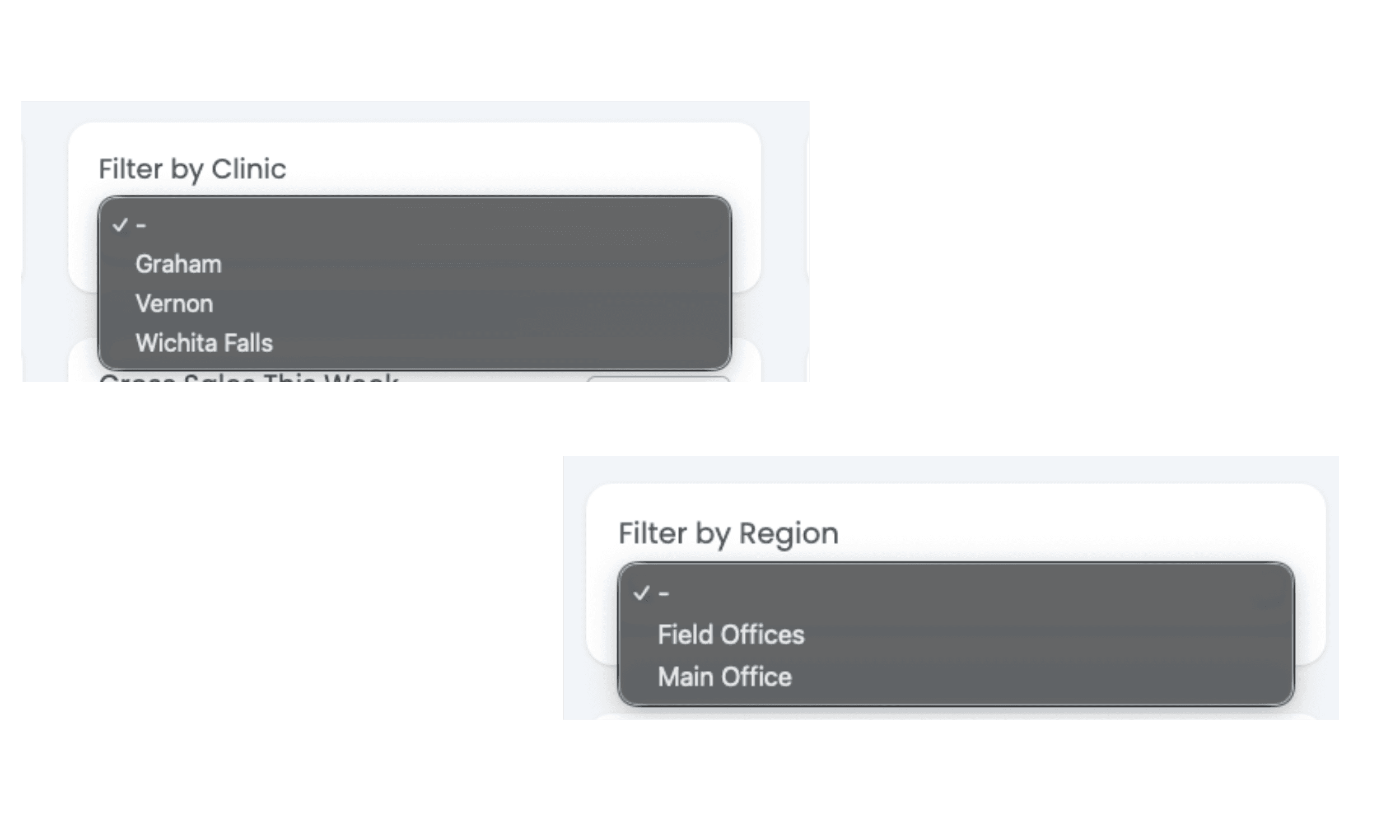
The production instance running Wichita Falls Hearing today uses Region as a meaningful intermediate level: Field Offices and Main Office are the two regions, with individual clinics nested inside. A practice with three clinics in Austin and three in San Antonio might define those two regions. A consolidator with twenty clinics across five states might define five. Region as a configurable primitive lets the data model match the operational structure rather than forcing the operation to match the data model.
Every dashboard, every report, and every operational view supports filtering and aggregation at all three levels. You see the full operation at Master view, one region at Regional Manager view, one clinic at Manager view, one provider at Provider view. The same data model serves all four; the role determines what gets surfaced.
This is the structural difference from systems that bolted multi-location on top of a single-clinic data model. The bolt-on can show aggregated reports across clinics, but it can't easily filter the front-desk pipeline by region, compare provider performance across two specific clinics, or surface the cross-clinic patient with appointments at two locations this month. The bolt-on shows the rollup. The native architecture shows the underlying structure at any level you want.
| Clinic | Visits | Tested | Fit | Needs you |
|---|---|---|---|---|
| Main Street | 18 | 6 | 3 | 2 pending fittings |
| Northside | 11 | 4 | 1 | 1 tested, not treated |
| Lakeview (part-time) | 5 | 2 | 1 | All clear |
The same filter works everywhere.
The Region/Clinic/Provider filter sits at the dashboard layer and applies across every report, every list view, every operational dashboard, every pipeline view, every patient search. Filter to one clinic and the entire interface scopes to that clinic. Filter to a region and it scopes to those clinics. Filter to a provider and it scopes to that provider's caseload across whichever clinics they cover.
This is the daily operational primitive that separates multi-location architecture from multi-location reporting. A regional manager running five clinics doesn't want an aggregate quarterly report. They want to scope the entire interface to their five clinics every time they log in, see the cross-clinic pipeline at the region level, surface provider performance variance across the region, and drill into a specific clinic when something needs attention. The unified filter does this. The bolt-on rollup does not.
Five named roles and configurable Permission Sets.
amplifyOMS ships with five named role views, each with its own dashboard composition and permission set. The roles match the actual operational structure of multi-location hearing care practices.
Concierge is the front-of-house role: check-in, appointment management, scheduling. Dispenser is the clinical care role: hearing tests, fittings, follow-up. Manager is the clinic-level operational role: staffing, daily operations, the owner's view at one clinic. Regional Manager is the multi-clinic role: regional patterns, cross-clinic comparisons, the operations director's view. Master is the full operation view.
The five named roles cover most configurations, but the architecture doesn't stop there. Permission Sets is a configurable administrative primitive for custom role definition. If your operation has a structure that doesn't fit the five roles cleanly, a regional billing specialist, a multi-clinic call center lead, an inventory manager spanning the operation, you define a custom Permission Set with exactly the permissions and dashboard that role needs, and assign it to the relevant users.
This is meaningfully more sophisticated than the role models documented for the four competitor systems, which generally offer fewer named roles and less configurable Permission Sets. The reason is operational: amplifyOMS was designed for practices that actually have regional managers, inventory specialists, and multi-clinic call center leads. The role architecture reflects what multi-location operations actually look like.
Your staff doesn't lose muscle memory.
Practice owners who have migrated from another OMS know the staff pain. Months of training before staff stop searching for the menu item where it used to be. Patient identifiers that meant something in the old system, meaningless in the new one. The receptionist who could find any patient by their legacy ID has to learn a new search pattern.
amplifyOMS handles migration continuity differently. Patients migrated from your previous OMS retain searchability against their legacy identifiers. The receptionist who knew Mrs. Henderson as patient 4847 can still search 4847 and find her in amplifyOMS. The legacy ID is preserved as a searchable attribute on the patient file. The staff muscle memory transfers.
This matters most at multi-location scale because the disruption of a migration compounds across clinics. A bad migration at one clinic is recoverable. A bad migration across ten clinics is a multi-quarter productivity hit. The continuity is an architectural choice that traces back to living through migrations at 22 clinics.
The migration itself remains free: no migration charge, licensing starts at signing. The continuity makes it easier to absorb. Both are decisions a practice owner who has been through a migration would make.
The pricing that rewards growth instead of penalizing it.
Multi-location practices don't pay full price per clinic. Additional full-time clinics run at 50 percent of the base tier price. Additional part-time clinics run at 25 percent. Practices over 10 clinics negotiate custom pricing directly with Dusty because the math gets specific to the operation. The structure is built so growth is a feature, not a tax.
See it at your operation's scale.
The walkthrough is about 25 minutes. We'll look at how your current operation is structured, where the Region/Clinic/Provider data model would fit, which roles map to your team, and what migration with continuity would look like for your specific patient base. Real product, not a sales tour.